
A client sends you a photo. Maybe it is a garland they saved from Pinterest, maybe it is a cake, maybe it is a bridesmaid dress. They say "these colors." Then you stand in front of your shelves trying to decide whether that pink is Tuftex Pink or Sempertex Fashion Rose, and whether the one next to it is a blush or just the same pink in shade.
Everyone in this trade has ordered the wrong pink at least once. The Balloon Color Analyzer in BalloonFlow AI is built for that exact moment.
What you get back
Photograph the design, or upload the photo the client sent. The analyzer reads the balloons in the image and returns:
- Every balloon color it finds, named in plain language rather than as a swatch you have to interpret.
- The hex value for each color, so you can drop it straight into a proposal, a mood board, or a mockup.
- The share of the design each color takes up, which is the part most color tools leave out. Knowing a photo is 40 percent blush and 8 percent deep magenta tells you the ratio to order, not just the palette.
- The closest matches from Tuftex, Gemar and Sempertex, so the answer is a balloon you can actually buy rather than a paint chip.
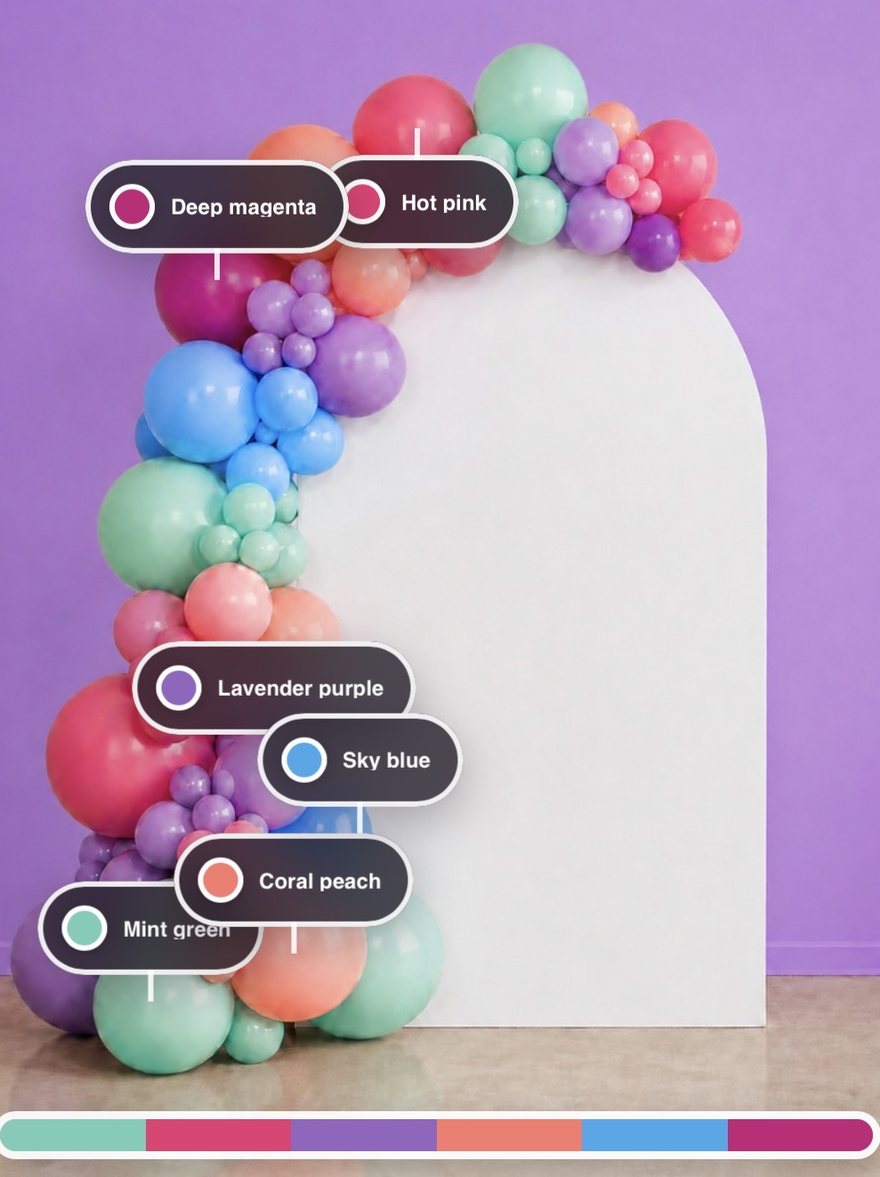
It reads the balloons, not the room
This is the part that makes or breaks a tool like this. Most general color pickers sample whatever pixel you point at, which means a white arch behind the garland, a shadow under a cluster, or a highlight bouncing off a chrome balloon all end up in your palette.
The analyzer is built to ignore backdrops, shadows and reflections and report the balloon colors themselves. You get the palette of the design, not the palette of the photograph.
Why the share percentage matters more than it sounds. Two garlands can use the identical six colors and look nothing alike. The difference is almost always ratio. When a client shows you an inspiration photo and says "like this, but our colors," the mix is the thing you are actually copying.
Using it for brand substitution
Substitution is the everyday version of this problem. Your supplier is out of the Tuftex color the client approved, the event is Saturday, and you need to know what comes closest in Gemar or Sempertex without driving to a shop to hold them side by side.
Because the analyzer returns closest matches across all three brands at once, a photo of the balloon you already have gives you the near equivalents in the other two. Same workflow, different question.
Where it fits in a real job
| Step | What the analyzer does |
|---|---|
| Client sends an inspiration photo | Names the palette and the mix so you can quote the right quantities per color |
| You build the proposal | Gives you hex values to show the palette back to the client in writing |
| Supplier is out of stock | Shows the closest equivalents in the other two brands |
| You want to reuse an old design | Turns a photo of past work into a repeatable color recipe |
What it does not do
Worth being straight about the limits, because color is genuinely hard.
- It reads the photo you give it. A picture shot under warm indoor light will read warmer than the same garland outdoors, the same way your own eye would.
- Closest match means closest, not identical. Latex color varies between production runs, and a matte and a chrome finish in the same nominal color will not photograph the same.
- Confirm against a physical color chart before you place a large order. Use the analyzer to narrow six hundred options down to three, then check those three by hand.
Used that way it removes the guesswork without pretending to be a spectrophotometer.
The rest of the app
The Color Analyzer is one part of BalloonFlow AI. The app also scores a garland photo and marks exactly where to add balloons, generates client-ready backdrop mockups, plans palettes from an event description, and runs the business side: leads, quantity and profit planning, branded proposals, e-signed contracts and Square deposits. That business half is covered on the balloon business software page.
Common questions
What does the Balloon Color Analyzer actually return?
For each balloon color it finds in the photo, you get a plain-language color name, the hex value, the share of the design that color occupies, and the closest matching balloons from Tuftex, Gemar and Sempertex.
Does it pick up the backdrop or the props in the photo?
No. It is built to ignore backdrops, shadows and reflections and report the balloon colors themselves, so a white arch or a dark shadow behind the garland does not end up in your palette.
Can I use it to find a balloon in a different brand?
Yes. Because it returns closest matches across Tuftex, Gemar and Sempertex at the same time, photographing a balloon you already have gives you the nearest equivalents in the other two brands. That covers most substitution situations when a supplier is out of stock.
How accurate is it?
It reads the photo you give it, so lighting affects the result the same way it affects your own eye. Treat closest match as closest, not identical, and confirm against a physical color chart before placing a large order. It is designed to narrow hundreds of options down to a few, not to replace a physical swatch.
Do I need a special photo?
No. A normal photo taken on your iPhone works. Even lighting and a clear view of the balloons give the best result, the same conditions that make a good photo for a client.
Is the Color Analyzer free?
BalloonFlow AI is free to download on the App Store. The AI features are part of BalloonFlow Pro, which is $29.99 a month and starts with a 7-day free trial for eligible new subscribers. You can cancel anytime in your Apple subscription settings.
Does it work on Android?
Not right now. BalloonFlow AI is built for iPhone, and it also runs on Macs with Apple silicon. Android availability will depend on demand.